Monitoring the availability of multiple servers is not just a task, but a cornerstone of your IT infrastructure's stability. For effectively tracking the operational status of a fleet of machines, a range of solutions exists: from simple cloud services that deploy quickly and don't require deep technical knowledge, to powerful self-hosted platforms offering full control and deep customization, as well as custom scripts for specific needs. The choice of the right tool depends on the scale of your infrastructure, budget, flexibility requirements, and your team's competencies. The main goal is to ensure timely problem detection and minimize downtime, so you can sleep soundly, knowing your system is under supervision.
Why is Availability Monitoring Not a Luxury, but a Necessity?

In today's world, where any delay or failure can lead to significant reputational and financial losses, reliable server availability monitoring is critically important. Let's understand why:
- Rapid Problem Detection: The faster you learn about a failure, the quicker you can react. Monitoring allows you to shift from reactive fixes to proactive incident management.
- Minimizing Downtime and Financial Losses: Every hour of downtime for a web server, database, or other critically important service can cost a company thousands, or even millions, of rubles. Timely alerts help reduce recovery time.
- Improving User Experience: The availability of your services directly impacts the satisfaction of end-users or clients. Stable operation is key to loyalty.
- Resource Planning and Scaling: While availability monitoring primarily concerns "alive/dead" status, many tools also provide performance metrics. By analyzing them, you can predict potential resource issues and plan for scaling.
- SLA Compliance: For many companies, especially those working under client contracts, compliance with Service Level Agreements (SLA) is mandatory. Monitoring provides data to confirm adherence to these requirements.
Main Approaches to Monitoring the Availability of Multiple Servers
The diversity of infrastructures and business needs has led to the emergence of several key monitoring approaches. Let's examine them in more detail.
1. Ready-Made Cloud Services (SaaS Solutions)
These services offer "monitoring as a service," allowing you to quickly set up checks without the need to deploy your own infrastructure. They are ideal for startups, small and medium-sized businesses, as well as for external monitoring of critically important web services.
Popular examples: Pingdom, UptimeRobot, StatusCake, Site24x7, Freshping.
How It Works?
You register on the platform, add the IP addresses or domain names of your servers, and specify the ports or URLs to check. The service periodically (e.g., every 1-5 minutes) sends requests to your servers from different geographical locations and, upon detecting unavailability, sends a notification.
Advantages:
- Quick Start: Setup takes mere minutes.
- Ease of Use: Intuitive interfaces, requiring no deep technical knowledge.
- Global Checkpoints: Monitoring is performed from various countries, allowing you to assess availability for different regions and identify routing issues.
- Minimal Maintenance: All infrastructure and support are on the provider's side.
- Variety of Check Methods: ICMP (ping), HTTP/HTTPS (status code, page content), TCP ports, DNS, SMTP/POP3/IMAP, FTP.
Disadvantages:
- Cost: Usually depends on the number of monitors and check intervals, and can increase with scale.
- Limited Customization: You are restricted to the functionality provided by the service.
- Provider Dependence: The availability of your monitoring system depends on the availability of the cloud service.
Example of HTTP monitoring setup in UptimeRobot:
Type: HTTP(s)
URL: https://your-server.ru/health
Interval: 1 minute
Timeout: 30 seconds
Keyword: "OK" (optional, for checking page content)
2. Self-Hosted Platforms
If you need full control, deep integration, and maximum flexibility, then deploying a self-hosted monitoring platform is your choice. This requires more effort upfront but pays off in the long run for large and complex infrastructures.
Popular examples: Zabbix, Nagios (and its forks, such as Icinga), Prometheus + Grafana.
Zabbix
A powerful and flexible platform supporting both agent-based and agentless monitoring. It allows collecting thousands of metrics from servers, network equipment, applications, and databases. It features a well-developed system of triggers, templates, and visualization.
- Pros: Extremely flexible, scalable, large community, rich alerting and visualization functionality.
- Cons: Quite complex to learn and set up initially, requires significant resources for large installations.
Example of checking port 22 (SSH) availability via Zabbix Agent (UserParameter):
UserParameter=ssh.port.check,nc -z -w 1 localhost 22 &>/dev/null; echo $?This parameter can be added to the Zabbix agent configuration, after which a data item can be created on the Zabbix server that will poll this UserParameter, and a trigger that fires if the value is 1 (port unavailable).
Nagios / Icinga
Among the oldest and time-tested monitoring systems. Nagios Core served as the foundation for many other projects, including Icinga, which is actively developed and offers a more modern interface and functionality. They use plugins for checks, making them highly extensible.
- Pros: Stability, a vast number of ready-made plugins, reliability.
- Cons: The interface might seem outdated (especially for Nagios Core), configuration in text files can be complex for large systems.
Prometheus + Grafana
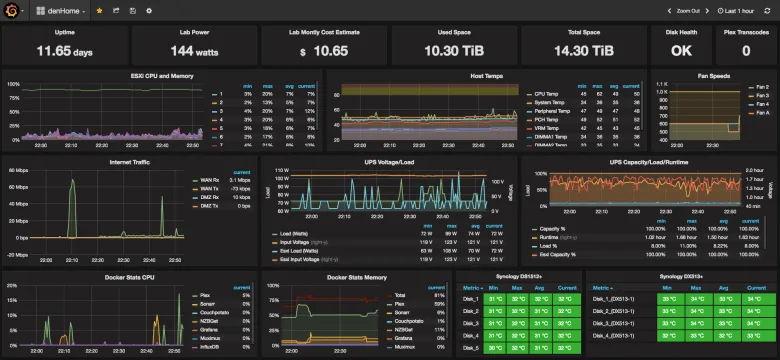
Prometheus is an open-source monitoring system focused on metrics. It uses a pull model (Prometheus itself scrapes metrics from target systems) and is ideal for dynamic environments such as containers and microservices. Paired with Grafana (a powerful tool for data visualization), it creates a very efficient and modern monitoring system.
- Pros: Excellent for metric monitoring, powerful query language (PromQL), high scalability, superb visualization with Grafana.
- Cons: Not a complete solution for logging or distributed tracing, requires learning a specific approach.
3. Cloud-Native Monitoring Platforms
If your infrastructure is entirely or predominantly deployed in a public cloud (AWS, Azure, Google Cloud), then using native monitoring tools can be the most effective.
Examples: AWS CloudWatch, Azure Monitor, Google Cloud Monitoring.
Advantages:
- Deep Integration: Automatic resource discovery, "out-of-the-box" metric collection for all cloud services.
- Scalability: Designed to work with dynamic and large cloud environments.
- Unified Control Panel: Centralized monitoring of the entire cloud infrastructure.
Disadvantages:
- Vendor Lock-in: Less convenient for hybrid or multi-cloud environments.
- Cost: Can quickly increase depending on the volume of collected data and the number of alerts.
4. Scripted Monitoring (Custom Scripts)
For very specific tasks, quick checks, or integration with unique systems, writing your own scripts remains a relevant and powerful tool. This allows you to control every aspect of the check.
When to use:
- Checking the availability of a specific internal API.
- Monitoring very rare or unique states.
- Lightweight checks on a small number of servers.
- Integration with existing internal alerting systems.
Languages: Bash, Python, Perl, PowerShell.
How It Works?
You write a script that performs the desired check (e.g., attempts to connect to a port, makes an HTTP request, checks for a process). The script returns a success/error code or outputs a message. Then you configure it to run on a schedule (e.g., via cron in Linux or Task Scheduler in Windows) and process the result, sending a notification if necessary.
Simple Bash script for checking HTTP availability:
#!/bin/bash
# Script for checking HTTP service availability and logging
URL="https://your-server.ru/health"
LOG_FILE="/var/log/http_monitor.log"
ALERT_EMAIL="admin@example.com"

# Get HTTP response code
STATUS=$(curl -s -o /dev/null -w "%{http_code}" $URL)

if [ "$STATUS" -ne "200" ]; then
    MESSAGE="$(date '+%Y-%m-%d %H:%M:%S') - ERROR: $URL returned status $STATUS"
    echo "$MESSAGE" >> "$LOG_FILE"
    # Send email notification
    echo "$MESSAGE" | mail -s "ATTENTION! Problem with availability of $URL" "$ALERT_EMAIL"
else
    echo "$(date '+%Y-%m-%d %H:%M:%S') - INFO: $URL is available, status $STATUS" >> "$LOG_FILE"
fi
This script can be run every 5 minutes via cron. It will record the status in a log file and send an email if the server is unavailable.
Need Reliable Hosting for Your Servers?
Ensure uninterrupted operation for your projects with our powerful VPS servers. Perfect for stable monitoring. — from €4.49/mo.
Choose VPS →Comparison of Approaches: SaaS vs. Self-Hosted
For clarity, let's summarize the key differences in a table to help you make an informed choice.
| Criterion | SaaS Solutions (Pingdom, UptimeRobot) | Self-Hosted Platforms (Zabbix, Prometheus) |
|---|---|---|
| Setup Speed | Very High (hours) | Low/Medium (days/weeks) |
| Setup Complexity | Low (via web interface) | High (installation, agent configuration, databases) |
| Flexibility/Customization | Limited (within service boundaries) | High (full control over logic and data) |
| Cost | Subscription fee (grows with scale) | Infrastructure and maintenance costs (personnel) |
| Scalability | Automatic (on provider's side) | Requires planning, resources, and team effort |
| Data Control | Limited (data stored with provider) | Full control (data on your infrastructure) |
| Admin Requirements | Minimal (management via UI) | Significant (installation, configuration, support, troubleshooting) |
Best Practices for Availability Monitoring
Regardless of the chosen tool, there are general principles that will help you build an effective monitoring system:
- External and Internal Monitoring: Use SaaS solutions for external monitoring (how users see it) and Self-Hosted/scripts for internal monitoring (status of services, resources).
- Granularity and Intervals: Do not overload the monitoring system with overly frequent checks, but also do not make them too infrequent. Optimal is 1-5 minutes for critical services.
- Thresholds and Triggers: Don't just monitor "up/down". Set up triggers based on thresholds (e.g., "response time over 500 ms for 3 minutes").
- Alerting System:
- Avoid "alert fatigue": Configure notifications to be meaningful. Don't alert on every minor detail; focus on what requires immediate attention.
- Escalation: Set up alert levels. First email, then SMS/messenger, then a call (e.g., via PagerDuty or Opsgenie) for the most critical cases.
- Integrate with your work tools: Slack, Telegram, Microsoft Teams – the faster the team sees the alert, the better.
"Good monitoring is that which wakes you up only when necessary, but always wakes you up."
- Documentation: What is being monitored, why, what actions to take when an alert triggers. This is invaluable for new employees or when working under stress.
- Regular Audit: Periodically review your monitoring system. Are all checks still relevant? Are there any "dead" monitors?
- Proactivity: Use monitoring not only for incident response but also for trend analysis. An increase in response time or a decrease in free space can be precursors to future problems.
Conclusions
Monitoring the availability of multiple servers is not a one-time setup, but a continuous process requiring attention and adaptation. It's an investment in the stability and reliability of your IT infrastructure, which pays off with the peace of mind of your team and the loyalty of your users.
The choice of the right tool or combination of tools depends on many factors: the size of your infrastructure, budget, requirements for flexibility and depth of control, as well as your team's competencies. Start simple, whether with a cloud service or a few scripts, and gradually scale and complicate the system as your needs grow.
Remember, the best monitoring is that which works for you, timely informs you about real problems, and allows you to focus on development rather than firefighting.
Scale Your Monitoring with Flexible Cloud Solutions
Achieve maximum performance and flexibility for your monitoring tasks. Our cloud instances are ready for growth.
Start with Cloud →