How to Set Up Cron Jobs on a VPS?
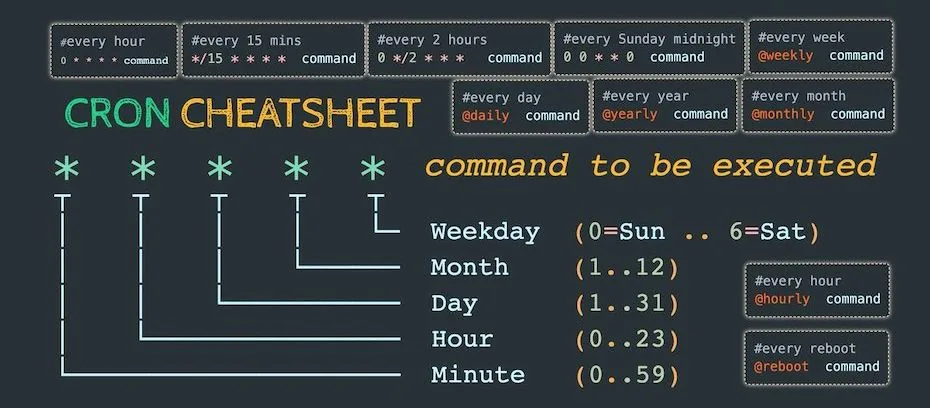
The cron system is a free program that allows you to run tasks on a schedule in UNIX operating systems. Setting up cron jobs on a virtual private server (VPS hosting) might seem like a complex task, but it's actually quite simple.To create a new cron job, you need to edit the crontab file. To do this, run the command:
crontab -e
This will open a text editor where you can add a new task. Each task must be specified on a separate line.
For example, if you want to run a script every day at 2 AM, add the following line:
0 2 * * * /path/to/script.sh
In this case, "0 2 * * *" specifies the start time (every day at 2 AM). "/path/to/script.sh" is the path to your script that should be executed.
After you've added all the necessary tasks, save the changes and close the editor. To see a list of all cron jobs, run the command:
crontab -l
Now all your tasks are configured and will run on schedule. Good luck administering your VPS!