Setting up an FTP Server on a CentOS 6 VPS
FTP (File Transfer Protocol) is one of the most popular methods for transferring files between computers. Setting up an FTP server on your CentOS 6 VPS hosting will allow you to easily transfer files to your server.This article will guide you through setting up an FTP server on a CentOS 6 VPS step-by-step. Before you begin, ensure you have root access to your server.
Step 1: Installing the FTP Server
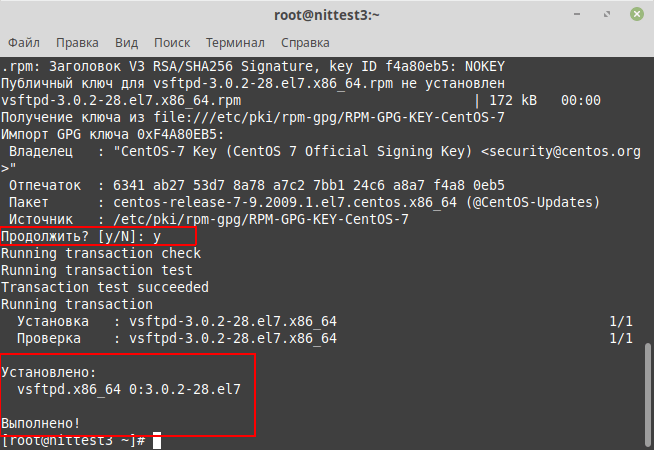
The first step is to install the FTP server on your VPS. Execute the following command:
yum install vsftpd
After installing the FTP server, you need to ensure the service is running. Execute the following command:
service vsftpd start
Step 2: Configuring the FTP Server
Now you need to configure the FTP server’s configuration file. Open the /etc/vsftpd/vsftpd.conf file using a text editor and make the following changes:
- Uncomment the line
anonymous_enable=YESand set its value toNOto disable anonymous access. - Add the line
local_enable=YESto allow access for users with system accounts. - Set
write_enable=YESto allow file uploads to the server.
Save the changes and restart the FTP server service using the command:
service vsftpd restart
Step 3: Accessing the FTP Server
You now have an FTP server set up on your CentOS 6 VPS and can connect to it using an FTP client, using your server’s servers with IP addresses, username, and password.Congratulations! You now know how to set up an FTP server on a CentOS 6 VPS. If you have any questions or encounter any problems, feel free to contact our support team.

![How to Set Up Automated VDS Backups in [Platform/Location]](https://valebyte.com/blog/wp-content/uploads/2025/11/leonardo_3b4910a9-300x169.jpg)